
Replay, switch, automate.Built for show day.
Per-flow JKL-scrub Replay, customisable per-sport tag profiles, push-to-air per clip, PGM/PVW Switcher, and cron-scheduled Routines that automate the show-day workflow with DST-correct timezones.
Per-flow JKL-scrub. Push-to-air per clip.
Visit /replay?node=&flow= on the manager and you're already in the replay UI. No separate replay server, no separate licence key.
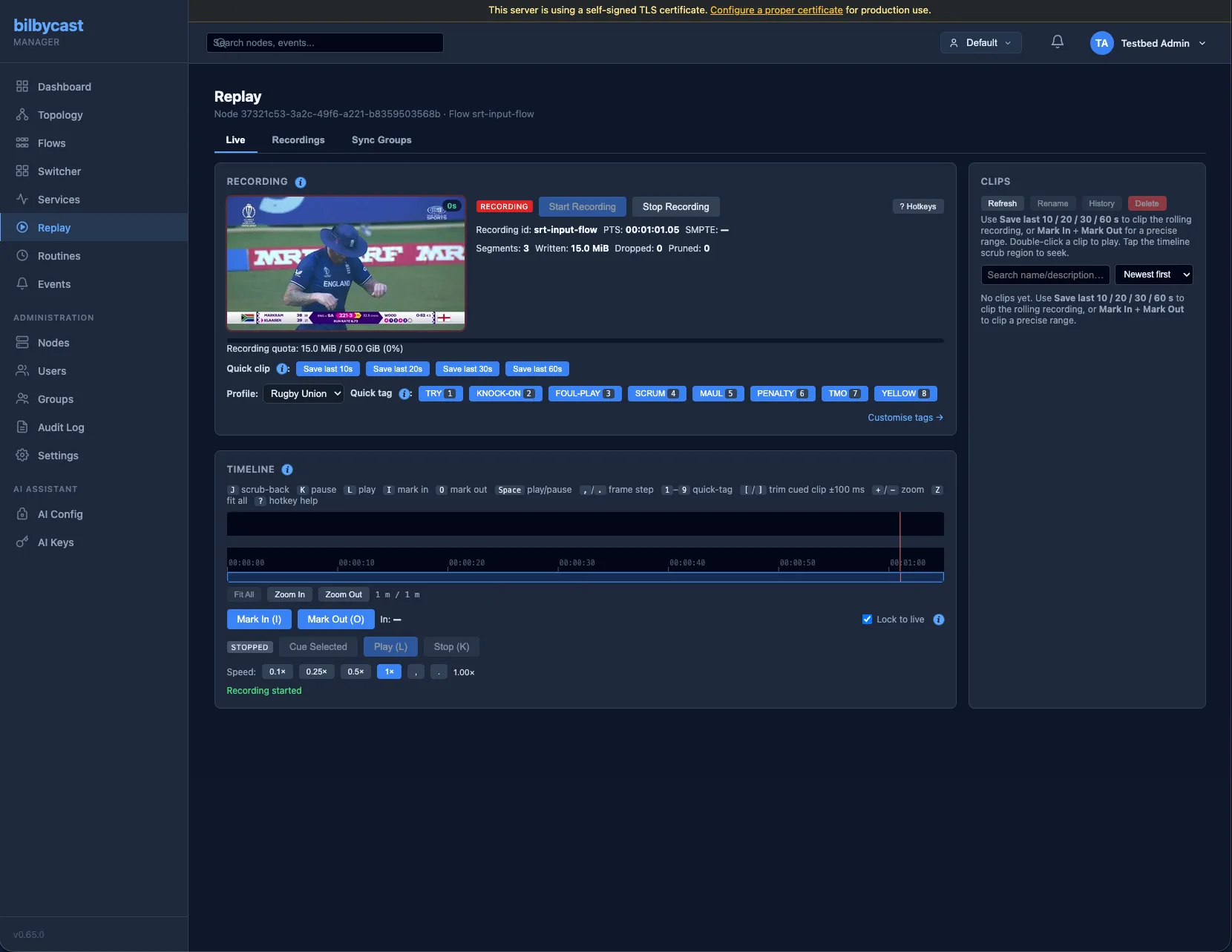
JKL-scrub timeline
Per-flow scrub with industry-standard JKL hotkeys. K toggles play, J/L step backward / forward at 1×. Hold Shift for fast scrub. Lock-to-live snaps you to the live edge.
Mark in / Mark out
I and O drop in / out points. Quick-clip last-N-seconds buttons (5 s / 10 s / 30 s / 60 s) for fast highlight grabs. Bracket-trim hotkeys [ and ] adjust ± 100 ms for fine work.
Customisable tag profiles
Per-group tag profiles seeded from a built-in sport-preset catalog. Up to 20 profiles per group, each with up to 9 tags. Hotkeys 1–9 rebind to the active profile. Per-operator selection persists in your UI preferences.
Push-to-air per clip
Trigger any clip onto an output flow with one click. The Push-to-air modal lets you pick which flow to inject to, with the flow card showing the live state.
Search, sort, and filter
Group-scoped clip library with search by name, sort by created / mark-in / duration, and tag-pill filtering. Multi-tenant Groups isolate clips per tenant.
Tri-state recording badge
Each flow card shows ● REC (armed and recording) / ● PRE-ROLL (auto-arming pre-buffer) / Idle. Pre-buffer mode keeps the last N seconds before any operator presses Start.
Built-in sport-preset catalog
Every group seeds from a sport-specific tag preset on first run. Operators can customise — up to 20 profiles per group, each with up to 9 tags matching [A-Z0-9_-]{1,32}. Hotkeys 1–9 rebind to whichever profile is active.
Default: Soccer preset. Defined instatic/js/shared/replay_tag_presets.js. Add your own in the manager admin UI.
PGM / PVW director console.
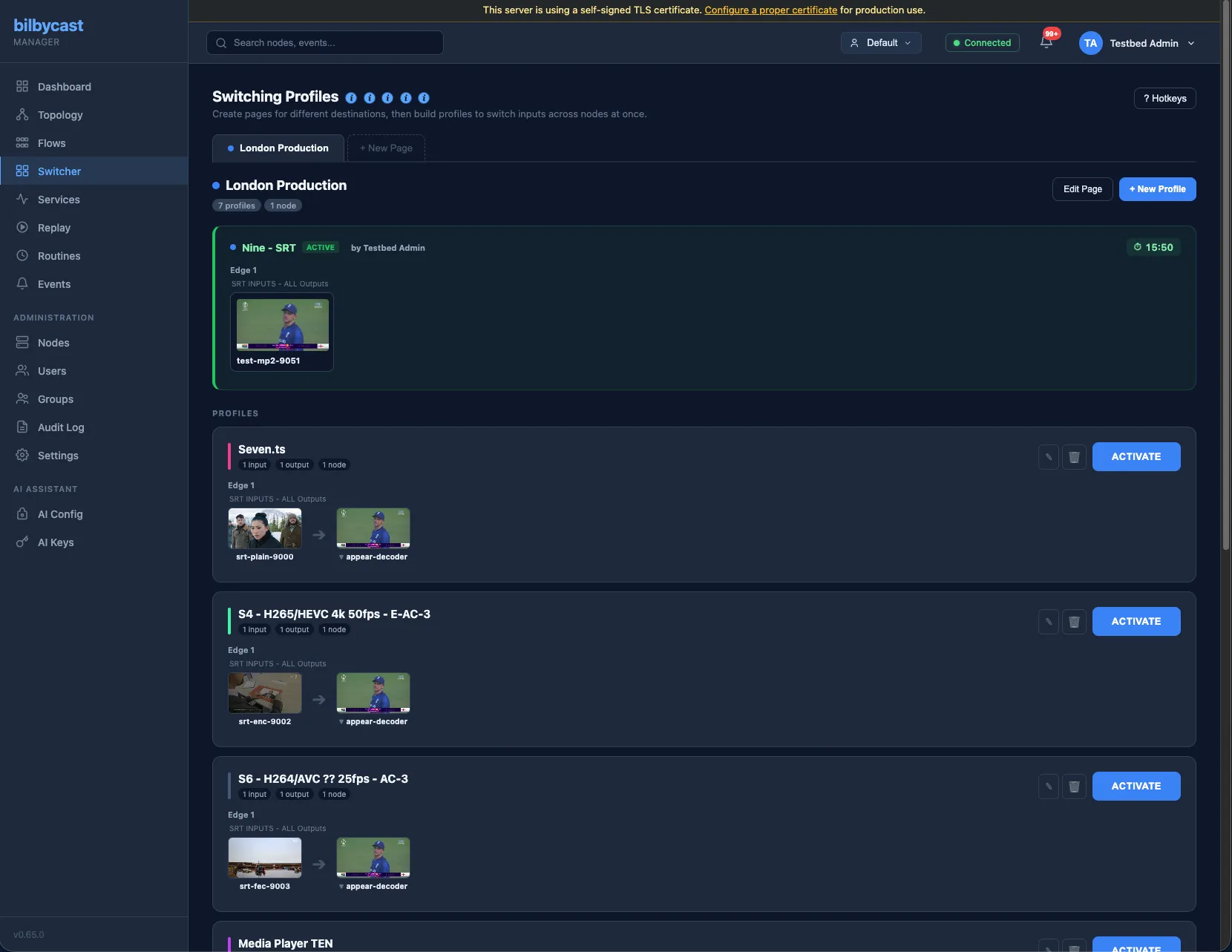
A live director console with Program / Preview, Take, and presets. Operates Bilbycast edges and third-party broadcast devices through the same driver-aware action system. Per-tenant Switcher pages keep operators scoped to their own group.
- PGM / PVW director console with Take button
- Per-tenant Switcher pages — operators see only their group
- Configurable presets for repeating shows
- Driver-aware action system — works with Bilbycast and Appear X devices
Automate the show day.
A Routine is a named target state across flows, plus a cron schedule for activation. DST-correct via IANA timezones (chrono-tz). Real-time fire-partial / fire-failed / missed events surface failed activations to the operator immediately.
At 14:30 IANA Australia/Sydney every Saturday during the season, set inputs A/B/C live, route to the studio uplink, start recording with 5-min pre-roll, post a kickoff event.
At 15:18 (configurable per-routine), stop game flow, route slate input to PGM, start ad-pod schedule, resume game flow at 15:33.
At 16:55 stop all 12 contribution flows simultaneously, push end-of-show clips to highlights archive, send a wrap-event to the manager.
Multi-tenant Groups, with brand theming.
Run multiple sports clients on one Bilbycast install. Each tenant gets isolated users, resources, quotas, and per-tenant logo + brand colour theming. Cross-group tunnels for shared infrastructure. Ownership transfer when a client takes their fleet in-house.
Set it up in 10 minutes.
Runs on commodity off-the-shelf hardware. Edge and relay are free under AGPL 3; manager is free for up to 10 nodes. No sign-up wall, no credit card. The same binaries you'd run in production.