
Node Bus Matrix
The Node Bus Matrix is bilbycast-manager’s authoring surface for the node-wide elementary-stream bus. It turns one edge into a full distribution matrix — every input’s programs can feed any output’s assembled flow, receivers stay locked through a Take, and the operator works on a crosspoint matrix that mirrors the way a routing-engineer thinks.
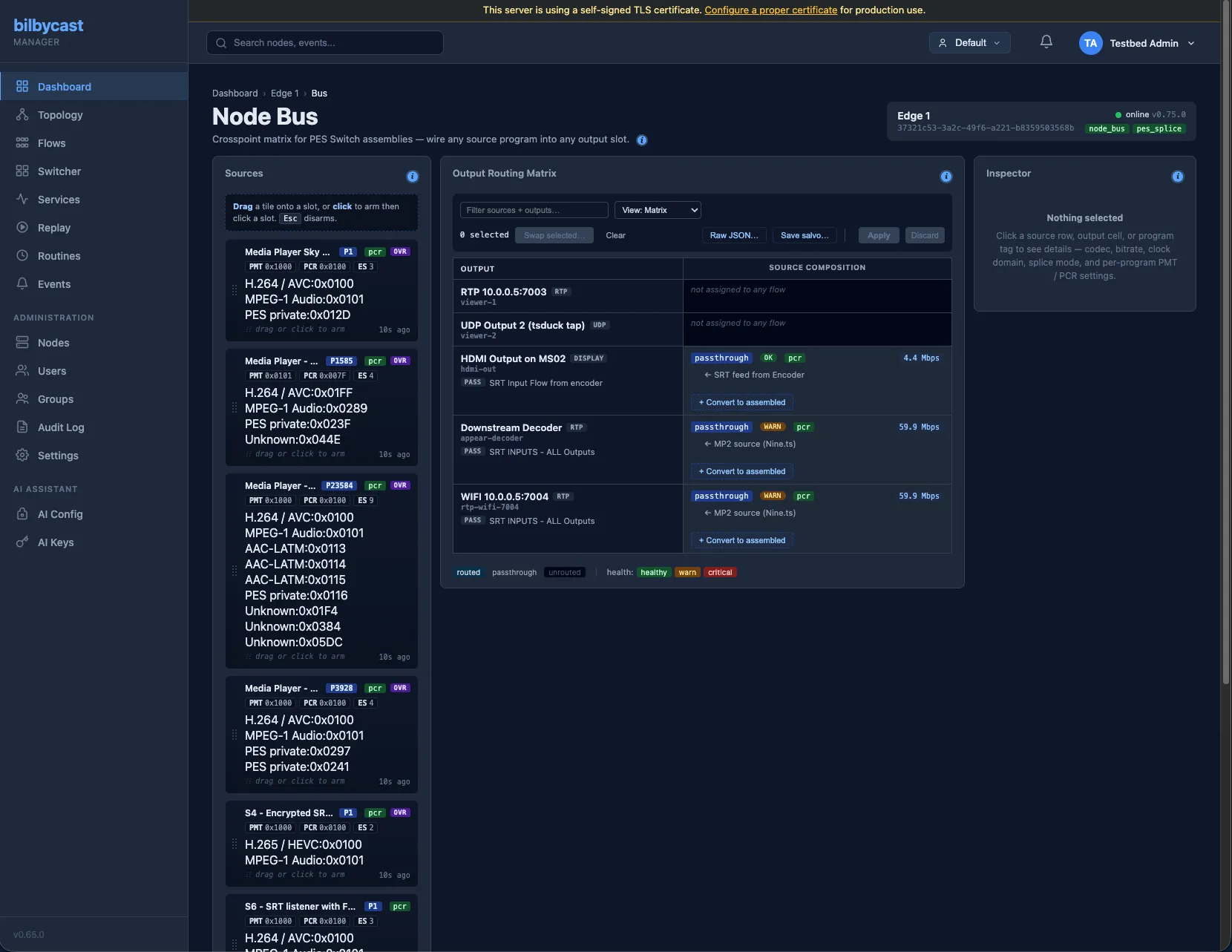
It replaces the legacy per-flow assembly form. On the flow modal you now see a small Assembly: N programs / M slots — [Open in Node Bus →] summary card; everything below the surface lives on /nodes/<id>/bus.
Why it matters
Section titled “Why it matters”Before, building an assembled flow meant opening the flow modal, expanding a nested form, navigating programs.0.streams.1.source.primary-style paths, and picking from a list that only showed inputs the flow owned. Cross-flow PIDs were invisible. Clock-domain mismatches surfaced only after a failed save.
The Node Bus Matrix flips this around:
- Every input’s program on the node shows up in the left pane as a tile, with clock identity, codecs, and live PSI staleness.
- Every output that runs an assembled flow shows up as a row in the matrix, with one cell per program.
- Wire a source onto a destination by clicking (or dragging) — Lawo-style orange marks pending changes; blue marks committed state.
- Master-clock identity preflight refuses cross-PTP-domain / cross-PCR-PLL combinations before the WS round-trip, so an operator can’t accidentally commit a mix that the edge would reject.
- A single Apply (N) commits every pending route atomically per flow.
This is the operator workflow for PES Switch — see Flow Assembly (PID Bus) for the splice strategies the matrix wires together.
Three-pane layout
Section titled “Three-pane layout”Sources (28%) Matrix (50%) Inspector (22%)─ programs-list ─ ─ crosspoint cells ─ ─ context detail ─program tiles one row per output clicked source / cellclock chip cells = per-program blocks / program → rendercodec pills pending = orange, server = blue appropriate form Apply / Discard toolbarSources pane
Section titled “Sources pane”Every program currently visible across the node’s TS-bearing inputs. Each tile carries:
- Master-clock chip —
[ptp:N],[pcr], or[wall]— so the operator sees at a glance which sources are co-clocked. - Per-stream pills — codec + PID, colour-coded by kind (video / audio / subtitle / data).
- Staleness fade — after 60 s without a PSI catalogue refresh, the tile dims so a stale source can’t accidentally be wired live.
A 120 ms-debounced search box at the top filters source tiles AND output rows in one keystroke.
Matrix pane
Section titled “Matrix pane”One row per output that runs an assembled flow. Cells render per-program blocks; each block lists its slots’ out_pid, stream_type, and current source label. Cells with pending changes turn Lawo orange via the .pending class; committed cells render blue.
Two equally first-class authoring entry points:
- Click-to-wire — click a source tile to arm it (chip in toolbar shows the armed label). Then click any empty / replaceable cell to wire
SlotSource::Pidinto pending state, kind-matched against the slot’sstream_type. Esc disarms. - Drag-and-drop — source tiles are
draggable. Dragging auto-arms; dropping on a[data-drop-target="cell"]element wires. Cells light up.drop-eligible/.drop-activeduring dragover.
Authoring affordances inside the matrix:
+ Add programbutton at the bottom of every assembled-output row. Auto-picks the next freeprogram_numberand PMT PID; PCR source defaults toauto;streamsstarts empty.+ Add slotbutton inside each program block. Auto-picks the next freeout_pidand defaultsstream_typeto H.264.+ Convert to assembledbutton on passthrough rows. Confirms, then POSTs a minimal SPTS shell via the fullupdate_flowpath (passthrough ↔ assembled can’t be hot-swapped, so the flow restarts; the matrix surfaces this in the confirmation modal).↩ Convert to passthroughbutton on assembled rows — the reverse. Confirms, then PUTs the whole flow with itsassemblyblock deleted down the same fullupdate_flowpath: the synthesised PAT/PMT and every program / slot definition is discarded and the flow forwards its active input’s bytes unchanged, so it restarts too. Any pending (unapplied) assembly staged for that flow is dropped on success, so a later Apply can’t silently revert the conversion.
Inspector pane
Section titled “Inspector pane”Context-sensitive form for the most-recently-clicked source / cell / program:
- Clicked source — full PSI breakdown (PMT PID, PCR PID, per-stream
stream_type+ label). - Clicked cell (slot) —
splice_modedropdown (pmt_bump/pes_aligned) andsplice_budget_msforSlotSource::Switchslots. Stages into pending state via the sameApply (N)button as wiring. - Clicked program — editable
pmt_pidandpcr_source. - Live lipsync trim — hits
POST /api/v1/nodes/<id>/flows/<id>/master-clock/lipsyncimmediately (live action, no pending stage), ±200 ms.
Pending state and Apply
Section titled “Pending state and Apply”pendingAssemblies: Map<flow_id, FlowAssembly> holds local edits. The toolbar shows Apply (N) / Discard whenever there is any pending route. Apply iterates each pending flow and PUTs /api/v1/nodes/<id>/flows/<id>/assembly; success clears the pending entry, failure surfaces inline in a toast carrying the pid_bus_* error code from the edge.
Per-flow atomicity is the contract: every slot in a flow either lands together or none of them do. Cross-flow Apply is multi-PUT — one flow can fail while sibling flows succeed; per-flow results land in the toast.
Matrix ↔ Single-Bus view
Section titled “Matrix ↔ Single-Bus view”A #viewModeSelect toolbar control toggles between the full matrix (every output × every program) and Single-Bus view (one output’s full vertical assembly, focused). Per-user preference persists via localStorage["bus_view_mode"] + ["bus_single_output_id"].
Raw JSON modal
Section titled “Raw JSON modal”Raw JSON… opens a textarea with the selected flow’s FlowAssembly pretty-printed. Save validates JSON.parse, then PUTs to the same /assembly endpoint. Useful for scripted bulk paste; doesn’t replace the matrix for everyday work.
Save salvo — capture routing as a Switcher preset
Section titled “Save salvo — capture routing as a Switcher preset”Save salvo… captures the current matrix routing as bus_route action stubs and POSTs to /api/v1/switcher/presets. The operator names it (e.g. “Half-time tally”, “Studio 1 mix”); the Live Switcher can recall it later in one click, including the per-action splice_mode_override baked into the stub. Salvos respect the active-tenant group, so a Group-A operator’s salvo never leaks into Group-B.
Capability gating
Section titled “Capability gating”The page is gated on the edge advertising node_bus on HealthPayload.capabilities. Edges below 0.63.0 don’t show the matrix. The flow-modal summary card still renders the deep-link regardless — older edges just land on an empty matrix.
Permissions
Section titled “Permissions”- View the matrix and PSI catalogue — Viewer+ in the node’s owner group.
- Wire routes and Apply changes — Operator+ on every flow the matrix touches.
- Add programs / Add slots / Convert to assembled / Convert to passthrough — Operator+ on the destination flow.
- Save salvo — Operator+ in the preset’s owner group, plus Operator on every action’s target node.
Permissions are enforced server-side; the matrix UI surfaces a permission-denied chip on cells the operator can wire-preview but not commit.
Composes with PES Switch
Section titled “Composes with PES Switch”The matrix is the authoring surface; PES Switch is the on-the-wire splice strategy. Every Switch slot wired through the matrix accepts splice_mode = pes_aligned (audio waits for the next PES AU boundary; video waits for the next IDR; AAC ADTS / LATM and H.264 / HEVC SPS sentinels refuse on parameter mismatch and fall back to PmtBump with a structured Warning). Per-switch splice_mode_override on a Switcher preset action overrides each slot’s config-time mode for a single Take. See Flow Assembly — Splice strategy.
Related
Section titled “Related”- Flow Assembly (PID Bus) — the edge-side runtime: per-flow assembly modes, slot sources, hot-swap semantics, validation rules, PES Switch splice strategies.
- Live Switcher — PGM/PVW director console. The Switcher’s
activate_input/bus_routeactions drive Switch-slot active legs across flows. - Routines — cron-scheduled fan-out that can recall a Switcher preset or fire a clip; chains naturally with salvos saved from the matrix.