
Services
Wiring a contribution path by hand means creating an output on one node, a matching input on another, a tunnel between them if either sits behind NAT, and then hoping the two ends agree about mode, port, latency and passphrase. Nothing checks that they do until the feed fails to lock.
A service is that whole arrangement provisioned as one transaction. You pick a wizard, fill in one form, and the manager builds a plan, pushes every step to every device in order, and rolls the finished steps back if one of them is refused. What it provisioned is then kept — parameters, plan, and every node it touched — so it can be re-applied, edited in place, versioned, and released again later.
Find it in the manager’s left navigation under Services (/services). It is available on every installation and needs no capability from any node.
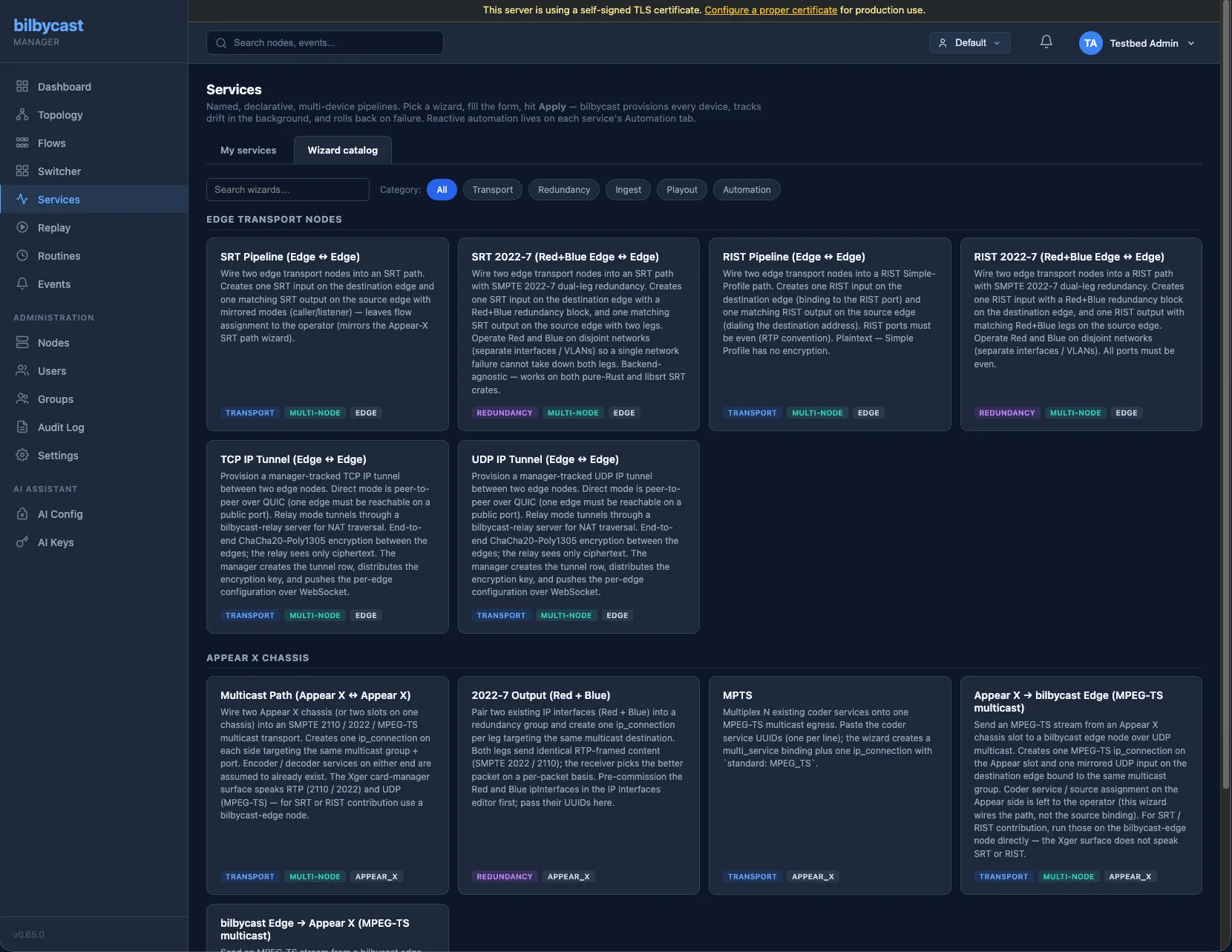
The two tabs
Section titled “The two tabs”My services is the default view: every service in the groups you can see, each as a card with a health dot, its lifecycle state and the wizard it was built from. Clicking one opens its detail view.
Wizard catalog lists every wizard registered by every device driver, grouped under a heading per driver — Edge transport nodes and Appear X chassis today — with a category filter (All / Transport / Redundancy / Ingest / Playout / Automation) and a free-text search over label, description and id. Templates you have saved appear at the bottom under Your templates.
The catalogue is not filtered by what hardware you own. Every registered wizard is listed whether or not you have a node it can target, because “this wizard exists but you have nothing to run it on” is a more useful answer than an empty page. Permission is enforced later, per node, when the plan is built.
The wizard catalogue
Section titled “The wizard catalogue”Wizards come from device drivers, not from the manager core, so the catalogue on your installation is exactly the set of drivers it was built with. Two drivers ship wizards today; the relay driver contributes none.
Edge transport nodes
Section titled “Edge transport nodes”| Wizard id | What it provisions | Category |
|---|---|---|
edge.srt-pipeline |
One SRT input on the destination edge and one mirrored SRT output on the source edge (caller pairs with listener; rendezvous is symmetric). Flow assignment is left to you. | transport |
edge.srt-2022-7 |
The same pair, with a Red + Blue redundancy block on both ends. Run the two legs on disjoint networks. | redundancy |
edge.rist-pipeline |
A RIST Simple-Profile path — input on the destination, output on the source. Ports must be even (RTP convention), and Simple Profile has no encryption. | transport |
edge.rist-2022-7 |
The RIST path with Red + Blue dual-leg redundancy. All ports even. | redundancy |
edge.bonded-link |
A bonded output and matching bonded input sharing one bond id, one encryption key and identical FEC geometry, plus a draft (disabled) flow on each side. A leg marked Via relay carries its relay routing inside the bonded I/O itself — there is no separate carrier-tunnel step. 1–8 legs, 2 by default. | transport |
edge.tcp-tunnel · edge.udp-tunnel |
A manager-tracked IP tunnel between two edges, direct over QUIC or through a relay for NAT traversal. | transport |
Appear X chassis
Section titled “Appear X chassis”| Wizard id | What it provisions | Category |
|---|---|---|
appear_x.create-multicast-path |
One ip_connection on each of two chassis (or two slots on one) targeting the same multicast group and port. |
transport |
appear_x.create-2022-7 |
Two pre-commissioned IP interfaces paired into a redundancy group, one ip_connection per leg. |
redundancy |
appear_x.create-mpts |
A multi_service binding over N existing coder services, plus one ip_connection with standard: MPEG_TS. |
transport |
appear_x.send-to-edge · appear_x.receive-from-edge |
An MPEG-TS multicast path between an Appear slot and a bilbycast edge, mirrored on both sides. | transport |
The Appear X card-manager surface speaks RTP (2110 / 2022) and UDP (MPEG-TS) only. For SRT or RIST contribution, run it on the edge.
The form is generated, not written
Section titled “The form is generated, not written”There is no hand-written screen per wizard. A driver publishes a typed field schema and the runner renders it, which is why a new wizard needs no manager UI work at all. Each field is one of:
| Kind | Renders as | Validated as |
|---|---|---|
text / multiline |
Single line or textarea | String, within the field’s max_len |
secret |
Password input | String, within max_len. Never stored in a template — stripped on create and on import |
integer |
Number | Within the field’s declared min–max |
bool |
Checkbox | Boolean |
select |
Dropdown | Must be one of the declared option values |
node |
Node picker, filtered to the driver’s device types | Non-empty id, ≤ 64 characters |
port |
Number | 1–65535 |
address |
Text | Non-empty, ≤ 256 characters. Anything beyond that is the driver’s own: the Appear X wizards parse the address, the edge ones take the string as typed |
repeatable |
A group with + Add / remove, e.g. the legs of a bonded link | Instance count within min_count–max_count, and every instance’s sub-fields checked as above |
Two ergonomic behaviours ride alongside the schema and change nothing about validation. Fields can be conditionally shown — the relay picker only appears once Path routing is set to Via relay — and address fields can suggest values, either the interfaces of the node you selected above (from its health telemetry) or the advertised dial address of the relay you picked. Both are advisory: you can always type something else, and the server re-validates whatever arrives.
A worked example — SRT between two edges
Section titled “A worked example — SRT between two edges”Open the Wizard catalog, pick SRT Pipeline (Edge ↔ Edge), and fill in:
| Field | Value | Notes |
|---|---|---|
| Source edge | truck-1 |
The edge that sends. |
| Destination edge | studio-a |
The edge that receives. |
| SRT mode (destination side) | listener |
The source mirrors automatically — it becomes the caller. Rendezvous is symmetric on both sides. |
| Destination address | 10.0.0.20 |
What the source dials. If the destination is behind NAT, this is its LAN bind address and you set Public address as well. |
| Destination port | 9000 |
|
| SRT latency (ms) | 200 |
Bounds 20–8000; 200 is the default. |
| Passphrase | (optional) | 10–79 characters. Blank means unencrypted. |
Everything below that is optional: AES key length (128 / 192 / 256, only read when a passphrase is set), cipher mode (aes-ctr or the authenticated aes-gcm, which needs libsrt ≥ 1.5.2 at the far end and rules out AES-192), stream id, an SRT FEC packet filter, separate receiver / peer latency overrides, and relay routing.
Preview Plan builds the plan and changes nothing. For the values above it comes back as two steps:
1. studio-a create_input Create SRT-listener input 'srt-in-4f2c91ab' on destination edge2. truck-1 create_output Create SRT-caller output 'srt-out-4f2c91ab' on source edgeSecrets are never shown back: the preview — and later a saved service’s parameters, steps and versions — reads [REDACTED] where an SRT passphrase, a bond’s encryption key or the user and password in a stream id would be. The manager stores them encrypted under its master key and sends them whole only to the nodes.
The ids are generated with an eight-hex-character suffix shared by both ends, so the input and its matching output are recognisably one pair. Switch Path routing to Via relay and a third step appears on the manager itself, creating the native-UDP tunnel that carries the SRT — the source then dials a loopback port the tunnel bridges, and the relay only ever forwards ciphertext.
Apply runs the plan. Each step is sent to its node and given 15 seconds to acknowledge; a step that fails or times out stops the run and every step already applied is rolled back in reverse order (delete_input, delete_output, delete_tunnel). The result pane marks each step ✓, ⚠ or ✗ — amber meaning the step was accepted but reported a partial outcome, such as a tunnel that reached only one of its two edges.
Note what this wizard does not do: it wires the endpoints, not the flow. Attaching the new input to a flow on the destination, and the new output to one on the source, is still your call.
Saving it as a service
Section titled “Saving it as a service”The Save as a Service checkbox in the run modal decides whether Apply leaves anything behind. Unticked — the default when you open a wizard from a catalogue card — Apply is a one-off: the entities are created on the devices and nothing tracks them afterwards. Ticked, and given a name and an owning group, the arrangement becomes a durable object.
That object carries a lifecycle state and a health rollup, and both are observable rather than gating — no handler reads lifecycle_state to decide whether to proceed. The one state-shaped refusal is Re-apply on a service that has never been applied: there is no current version to re-run, so it comes back 409 no_current_version.
| Lifecycle | Meaning |
|---|---|
designed |
Created with Apply deferred. The plan exists; nothing has been pushed. |
provisioning |
An apply is in flight. |
active |
Every step confirmed. Health healthy. |
degraded |
Applied, but at least one step came back pending, or the reconciler has since found drift. Health degraded. |
failed |
The apply was refused and rolled back. Health failed, with the device’s message on the card. |
releasing / released |
Teardown in progress, then done. |
A service holds at degraded rather than flipping green whenever a step acknowledged but reported a partial push. That is deliberate: a tunnel that reached one edge and not the other is not a working link, and showing it green is how a half-dead path sits unnoticed.
The service detail view
Section titled “The service detail view”Opening a service gives four tabs and a header row of actions.
Overview leads with a signal-flow diagram, then the facts: description, wizard, lifecycle, health and health message, carrier tunnels (or Direct — no relay carrier tunnels), owning group, when it was last applied, and the stored parameters, secrets redacted.
Steps lists the current version’s plan — the step number, its description, its target node, the action type, the entity it created, and its push status (pending, pushed, failed or drifted).
Versions is the history: each row is a version number, its apply status, when and by whom, its step count, and its error if it failed.
Automation is described below.
| Action | What it does |
|---|---|
| Edit configuration | Re-opens the wizard form pre-filled from the stored parameters. A secret you leave as it is is kept, and one you type over is replaced; a value that still shows [REDACTED] but has been edited around it is refused (400 redacted_value), so retype the whole value. Apply always writes a new version, and the manager hands the driver the previous version’s plan so it can re-provision in place. Only edge.bonded-link reads it today: that wizard emits update_* steps against the same entity ids. Every other wizard ignores the prior plan and mints fresh create_* steps with new ids, so the originals sit on the device until the service is released (Release walks every version, so they do get torn down then). |
| Re-apply | Re-runs the current version’s plan unchanged, with no version bump. This is the button for drift — a node that was rebuilt, or somebody who deleted an input underneath the service. |
| Save as template | Turns the service’s settings into a reusable catalogue entry. |
| Release | Rolls back everything the service ever provisioned and marks it released. It asks first. |
Release walks every version, oldest first, and rolls back in reverse step order, de-duplicating by (node, entity) so each thing is torn down once. Walking only the current version would leak entities created on version 1 that later versions merely updated. The service row itself is kept for audit unless the call passes ?purge=true, which cascades the versions and steps away with it.
Drift detection
Section titled “Drift detection”A background pass every 60 seconds walks every pushed step of every active service and checks that the entity it created is still present in the manager’s cached copy of that node’s config. Steps that provisioned a tunnel are checked differently — against the tunnel’s per-leg push status, since a tunnel lives in the manager rather than on one node.
A step whose entity has gone flips to drifted, its service drops to degraded, and one service_drift event is raised per service per pass (severity Warning, category service) carrying the step index, the entity kind and id, and the reason. A leg that is merely pending is treated as healthy for now — the tunnel push retry owns that transient, and counting it as drift would make the service health flap on every reconnect.
The reconciler is strictly read-only. It never re-pushes and never deletes. Recovering is Re-apply, either by hand or bound to the drift event as an automation.
Automation
Section titled “Automation”The Automation tab binds reactive recovery to a service. Each option is a single-click toggle that mints a routine plus an event-triggered schedule whose filter is scoped to this service and the nodes it provisioned onto. You never write the JSON.
| Toggle | Trigger | Debounce |
|---|---|---|
| Re-apply on drift | service_drift on this service |
30 s |
| Restart flow on unexpected stop | flow_stopped_unexpectedly on a contributing node |
60 s |
| Stop recording on disk pressure | replay_disk_pressure on a contributing node |
120 s |
The signal-flow diagram
Section titled “The signal-flow diagram”The Overview tab draws the service as a picture, derived entirely from its provisioning steps: a card per node, a chip per input and output showing its address, port, mode and protocol options, and a line per link. Arrows follow media direction — output to input — never the dial direction, so a listener-side input is drawn as the destination even though it is the end that waits.
Two things it shows that are easy to misread. The _manager sentinel that owns tunnel steps is never drawn as a node; it is folded into a relay hop drawn as a dashed line between the two real endpoints. And the ring colour on each chip is provisioning state — whether the config was pushed — not live signal presence. A green ring means the device accepted the configuration, not that video is flowing.
Where a pairing is ambiguous the diagram leaves an endpoint dangling rather than guessing at a line. Hovering any chip or link gives the full untruncated detail.
Templates
Section titled “Templates”A template overlays a built-in wizard with pre-filled values and, optionally, locked fields — so a repeated arrangement becomes one catalogue card an operator cannot get wrong. Build one with + New template on the Wizard catalog tab, or from Save as template on a service you already have working.
Locked fields render read-only in the form, and the lock is re-applied server-side when the template is instantiated: the operator’s submitted value for a locked field is discarded and the template’s own value put back, so a hand-crafted API call cannot get past it. A field can only be locked if it also has a pre-filled value — locking a field with nothing pinned to it would mean nothing.
Secret fields are never stored. Passphrases and keys are stripped on create and on import, which is what makes a template safe to write to a file and hand to somebody. Trying to lock a secret field is refused outright (template_locks_secret); secrets are always supplied at instantiation.
Templates carry an owning group and can be shared with others, exported to a portable JSON document (format: bilbycast.service-template, version 1) and imported into a different manager installation, which re-validates the base wizard and re-strips secrets rather than trusting the file. A template whose base wizard isn’t registered on this manager shows as base unavailable and cannot be instantiated.
Deleting a template does not refuse while services are built from it; it detaches them and reports how many, since the services own their own copies of the parameters by then.
Permissions
Section titled “Permissions”Permission on a service is per node, not per service, and it is checked against the plan rather than the form.
- Applying a wizard or a service — preview included — requires Operate on every node the built plan touches. A wizard whose descriptor is visible to you may still be refused at this point.
- Releasing a service, editing its configuration, or binding an automation to it, requires Operate on every node it has ever provisioned onto, across all versions. An edit keeps the secrets a read hid and sends them wherever its new plan goes, and those nodes are the editor’s choice. Being able to see a service only takes membership in its owning group at any role, including Viewer, which is not enough to tear one down or to mint a routine that will fire commands at its nodes.
- Creating, editing, deleting or importing a template requires Operator in the owning group. Sharing one requires Admin there.
- Services and templates are tenant-scoped through Multi-tenant Groups; a service must be given an owning group when it is saved, and a SuperAdmin browsing All groups must pick one explicitly.
Upgrading
Section titled “Upgrading”The release that seals a service’s secrets at rest carries migration 0079. The first start of an upgraded manager seals every stored service’s form, plans and pushed steps, once per installation, and leaves only a redacted copy in the columns the older binary reads. An older binary therefore re-applies or edits a sealed service with [REDACTED] — ten characters, a valid SRT passphrase — in place of its passphrase or key, so:
- Do not roll this release through an HA cluster one instance at a time. Stop the manager on every other instance, upgrade one and let it start, then upgrade and start the rest. If an older instance did run alongside, a service it created stays unsealed until
DELETE FROM settings WHERE key = 'service_plans_sealed';and a restart of an upgraded instance seal it, and an edit it made to an existing service’s configuration must be made again. - Rolling back means restoring the pre-upgrade database snapshot the upgrade script takes. An older binary must not run against a sealed database even with
0079deleted from_sqlx_migrations, so there is no in-place reverse for this release. That snapshot, like any dump taken before the upgraded manager first started, still holds the secrets in clear: guard it as you would them, and replace it once you no longer need it to roll back.
Audit trail
Section titled “Audit trail”| Action | Audit row |
|---|---|
| Apply a wizard or service plan | wizards.apply |
| Release or purge a service | services.release / services.purge |
| Create, edit, delete, import a template | service_template.{create,update,delete,import} |
| Share a template with a group, or stop | service_template.share.put / service_template.share.delete |
The service_template.* rows carry the owning group, so they appear in a tenant admin’s filtered view of the audit log. The wizards.apply, services.release and services.purge rows do not — they are written with no group on them, which means only a SuperAdmin browsing All groups will find them.
REST surface
Section titled “REST surface”| Method | Path | Purpose |
|---|---|---|
GET |
/api/v1/wizards |
Every wizard every driver registers, with its field schema and UI hints. |
POST |
/api/v1/wizards/{id}/preview |
Build the plan and return it. No side effects. |
POST |
/api/v1/wizards/{id}/apply |
Run the plan as a one-off. Nothing is persisted but the wizards.apply audit row. |
GET POST |
/api/v1/services |
List services in your visible groups; create one (apply_now defaults to true). |
GET PUT DELETE |
/api/v1/services/{id} |
Detail with versions and current steps; re-apply with new params or update metadata; release (?purge=true also deletes the row). |
POST |
/api/v1/services/{id}/reapply |
Re-run the current version’s plan unchanged. |
GET |
/api/v1/services/{id}/versions |
Full version history. |
POST DELETE |
/api/v1/services/{id}/automations |
Bind or unbind one curated automation option. |
GET POST |
/api/v1/service-templates |
List or create a template. |
POST |
/api/v1/service-templates/import |
Create one from an exported document. |
GET PUT DELETE |
/api/v1/service-templates/{id} |
Read, edit or delete a template. |
GET |
/api/v1/service-templates/{id}/export |
Portable JSON, no secrets and no tenancy fields. |
GET |
/api/v1/service-templates/{id}/shares |
Which groups the template is shared with. |
PUT DELETE |
/api/v1/service-templates/{id}/shares/{group_id} |
Share with a group, or stop. |
/api/v1/orchestrator/preview and /api/v1/orchestrator/apply remain registered as deprecated aliases that translate the old payload shape into a wizard call, and /orchestrator in the browser redirects to /services.
Reference
Section titled “Reference”- Wizards come from drivers: Device Drivers.
- What an automation mints, and what an event filter matches: Routines.
- Tunnels a relay-routed service creates for you: IP Tunneling.
- Full REST surface alongside the rest of the API: API reference — Services, wizards & templates.