
Live Switcher
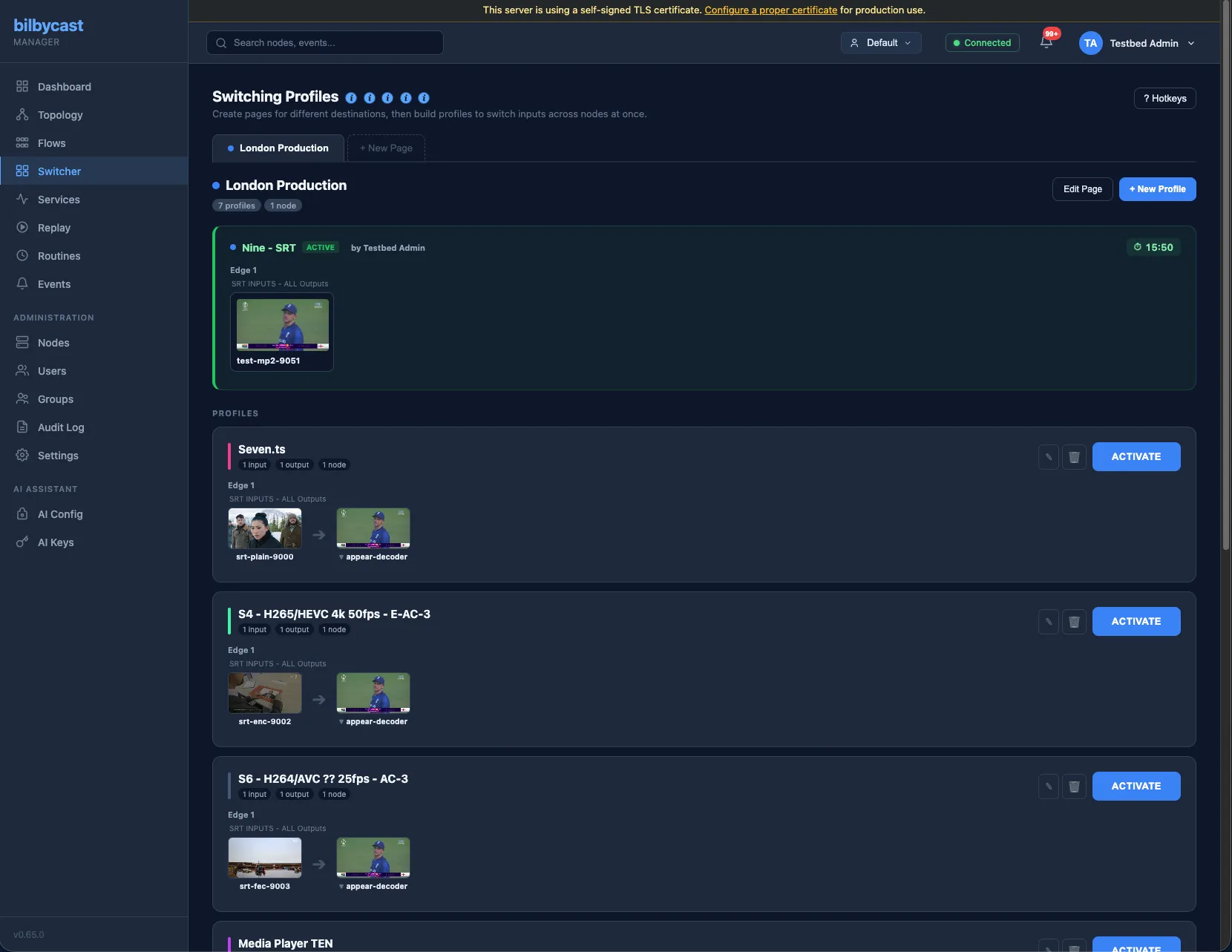
The Live Switcher is bilbycast-manager’s in-browser director console. It models a classic broadcast production switcher — two on-air buses (PGM, PVW), named presets that capture a target state across one or more flows, and pages that group presets for fast operator navigation. It runs in the same browser tab as the rest of the manager, so an operator can monitor signal health, take a preset on-air, and acknowledge an alarm without context-switching.
Why it matters
Section titled “Why it matters”Broadcast directors recognise PGM/PVW immediately — it’s the surface a vMix, Tricaster, Studer, or hardware production switcher gives them. The Live Switcher brings that workflow into bilbycast without a second appliance, and drives bilbycast flows directly so the same presets that switch a clean feed in the studio also flip every downstream output.
For multi-customer plants the switcher is per-tenant: an operator in Acme Media never sees Globex Broadcasting’s presets, and one tenant’s director can’t accidentally take another tenant’s feed on-air.
Concepts
Section titled “Concepts”- A preset is a named bundle of actions. Each action is “set flow X on node N to use input Y as its active input” — the preset choreographs which input each flow is currently watching.
- The PGM bus is what’s on-air right now. The PVW bus is what’s queued up for the next take.
- Take promotes the PVW preset to PGM in one click. It re-runs the preset’s actions against the live edges, clears the PVW marker on success, and writes a
switcher.takeaudit row. - Pages group presets so a director can flip between, say, an “Indoor cameras” page and an “Outdoor cameras” page without scrolling.
Workflow
Section titled “Workflow”A typical sports-broadcast workflow:
- The director loads “Match Camera” onto PVW and sees the preset card flash a
PVWchip. - The action list expanded inside the card confirms which flows on which edges will be re-pointed.
- On a goal, the director clicks Take. Match Camera flips to
PGM, the previous PGM (“Stinger”) clears, and every downstream output starts pulling from the match-camera input. - While Match Camera is on PGM, the director loads “Replay” onto PVW, ready for the next take.
For deterministic, no-preview activations, the Activate button on a preset card fires it straight to PGM. Useful for emergency cutaways and alarm-driven workflows.
Drift detection
Section titled “Drift detection”Each preset card carries a matches current state badge. The manager periodically reconciles the preset’s intended actions against the cached node configs; if reality has drifted (someone manually changed an active input on the edge) the badge clears and the PGM marker auto-clears too. This protects against “Take”ing a preset whose state is already wrong — the director sees that PGM is now in an unknown state and can re-evaluate.
Composes with Routines
Section titled “Composes with Routines”Presets can be activated by Routines on a cron schedule. A “Sunday 18:00 evening news” routine that activates the “Evening News” switcher preset reuses the same per-node Operate permission checks as a manual director click — no second permission model, no second audit trail.
Composes with Flow Assembly — three behaviours of “active input”
Section titled “Composes with Flow Assembly — three behaviours of “active input””A preset action is (node_id, flow_id, input_id) — “make input Y the active input on flow X”. The same shape covers three on-the-wire behaviours, depending on the target flow’s assembly mode (set on the flow modal):
- Passthrough flow — Take flips which input’s bytes are forwarded byte-for-byte. Output PIDs follow the new active input; receivers see new PMT versions and re-tune. The continuity fixer cushions CC + PMT version + DI to keep cutover seamless.
- Assembled flow without Switch slots — the manager translates the Take rather than passing it through. On a single-program (SPTS) assembly it becomes a
bus_routeswap that re-points that program’s slots onto the target input’s bus program, hot-applied as anupdate_flow_assemblywith no flow restart. On a multi-program (MPTS) assembly it is refused as ambiguous (pid_bus_activate_input_no_switch_slots) and each program has to be re-pointed in the Node Bus Matrix instead. It is refused too when the target input has no PAT/PMT-observed program on the bus yet (pid_bus_source_not_on_bus), or when that source can’t cover every slot of the destination program by stream kind (pid_bus_take_slot_uncovered) — a half-re-pointed program would ship video from one source and audio from another. - Assembled flow with Switch slots — Take flips the active leg of every Switch slot whose leg list contains the named input. Output PIDs stay unified across switches (each slot’s
out_pidis fixed); only the source leg flips. PMT version bumps mod 32 + DI=1 fires on the next PCR for the affectedout_pidso receivers re-anchor STC without re-tuning. Slots without that input as a leg are silent.
Operators build presets exactly as before in all three cases — there’s no separate Switch-aware preset type. The flow modal’s summary card deep-links into the Node Bus Matrix where the operator picks the mode (and, for the third case, builds the Switch slot’s leg list); the Switcher then drives whichever mode the flow runs in.
Per-action splice override
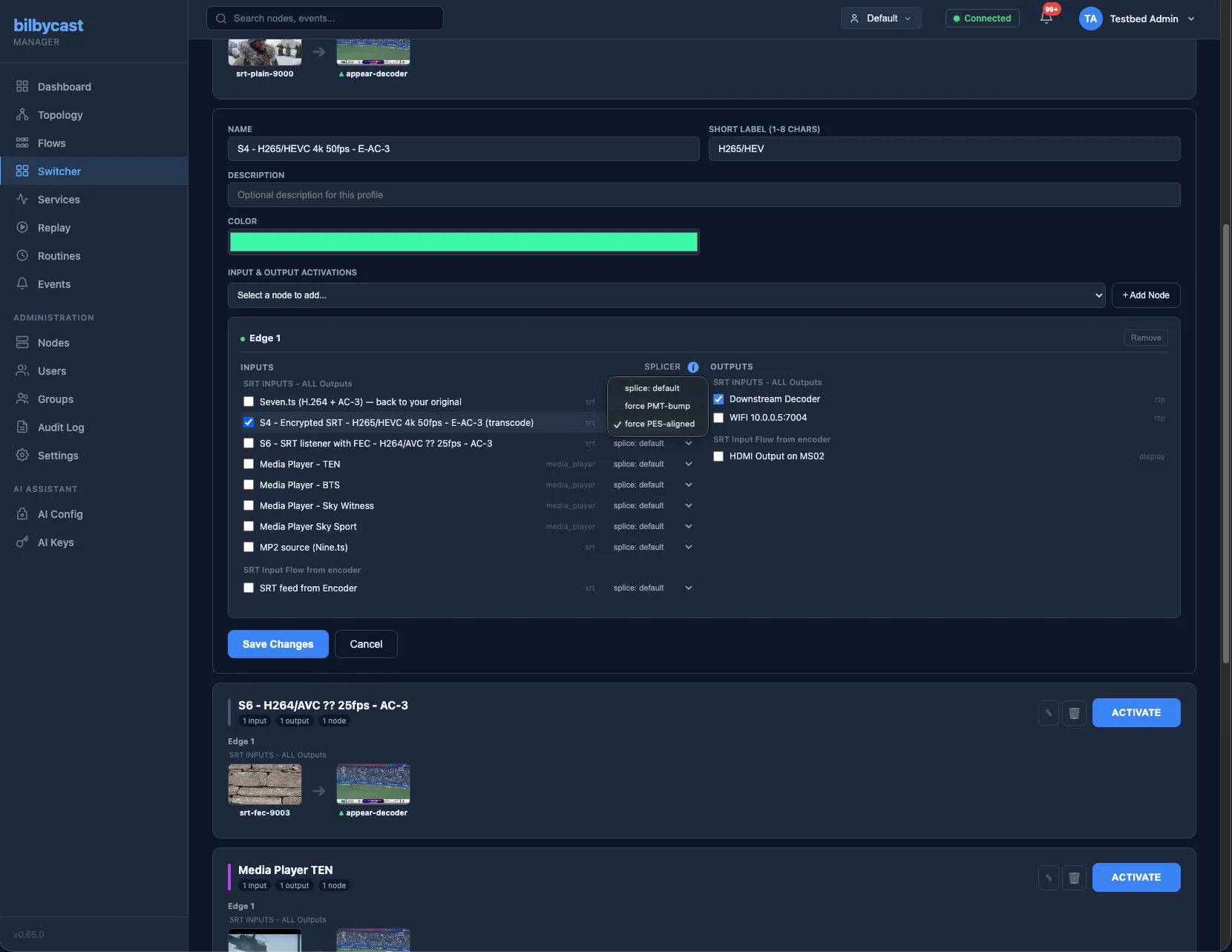
Section titled “Per-action splice override”For the third case above (assembled flow with Switch slots), the preset editor exposes a per-action splice: default | force PMT-bump | force PES-aligned dropdown. default sends no override and lets the slot’s config-time splice_mode apply. Explicit choices ride on the action’s splice_mode_override payload and beat the slot’s config for that one Take only — useful for an emergency override without editing the assembly. See Flow Assembly — Splice strategy for what each mode does on the wire.
Bus-route actions (Node Bus salvos)
Section titled “Bus-route actions (Node Bus salvos)”In addition to activate_input, presets can carry bus_route actions. A bus_route action is (node_id, dst_flow_id, dst_program_number, source_input_id, source_program_number) — “re-point program X on flow A to pull from program Y on input B”. They are authored directly in the preset editor: every node section carries a Bus routes block with cascading destination-flow and destination-program pickers, a source-input picker fed by that node’s bus catalogue (with a Custom… fallback that takes a typed input id and program number for a source the catalogue hasn’t seen yet), a source-program picker and an + Add button — over a live coverage preview that dry-runs the same kind matching the manager applies on activate: uncovered slots and a source that isn’t on the bus yet render amber, a flow or program that no longer exists renders red. There is one route per (flow, program), so re-adding replaces the existing chip. The Node Bus Matrix’s Save salvo… button is the bulk-capture shortcut, stamping the same action shape from a matrix you’ve already wired. The Switcher executor reuses the same per-flow patch-build + cross-clock preflight + atomic update_flow_assembly pipeline as the matrix’s Apply (N) button, so a salvo recalls the full routing snapshot in one click. See Node Bus Matrix.
Traffic runs the other way too: an activate_input action aimed at an assembled single-program flow with no Switch slot is executed as a bus_route swap — see Composes with Flow Assembly above.
Permissions
Section titled “Permissions”- Listing and activating presets requires the Operator role in the preset’s owner group, plus per-node Operate permission on every action’s target node.
- Creating, editing, and deleting presets and pages requires the Admin role in the owner group.
- Switcher pages and presets are first-class tenant-scoped resources via Multi-tenant Groups — they can’t be moved across tenants by accident, and SuperAdmin in “All groups” mode can administer every tenant’s switcher from one console.
Audit trail
Section titled “Audit trail”Every meaningful action is audited:
| Action | Audit row |
|---|---|
| Activate preset directly | switcher.preset.activate, with all_succeeded in its details |
| Promote PVW → PGM | switcher.take, with all_succeeded in its details |
| Set / clear PVW | switcher.pvw.set (naming the preset) / switcher.pvw.clear — only when the bus actually changed |
| Create / update / delete preset or page | switcher.preset.{create,update,delete} / switcher.page.{create,update,delete} |
Every row carries the group that owns the page or preset — for a Take or a PVW change, the group whose bus moved — so that group’s Admins see it on their audit log and no other tenant does. Until 2026-10 the update, delete, activate and Take rows carried no group, so only a SuperAdmin saw them, activate and Take stored their details where the client address belongs, and PVW changes were not audited at all. Rows written before the fix stay as they were.
PVW is not a browser-local marker, though. Like PGM it is server-side state owned by the tenant: setting it requires the Operator role in the preset’s owner group, and the new bus state is pushed to every connected client in that group, so every director on the show sees the same preview armed. Clearing PVW without naming a preset acts on the group you are currently pinned to — if you are in more than one and have not chosen, the manager refuses rather than clear another tenant’s stage. The schema enforces at most one PGM and one PVW marker per tenant.
Reference
Section titled “Reference”- Operator walk-through: the Workflow section above.
- REST surface (presets, pages, PGM / PVW state, Take): API reference — Switcher.
- Crosspoint authoring and salvo capture: Node Bus Matrix.